

Model Train Guides
DCC CVs Explained: Addresses, Acceleration and Speed Control
A configuration variable, or CV, is a stored decoder setting. The CV number identifies the setting; its value determines how the decoder behaves. CV3, for example, is the acceleration setting on a supporting motor decoder. That does not mean 3 is the right value to enter.
Start with the exact decoder manual and the job you want to improve: selecting the locomotive, making starts gentler or limiting its speed. Many common CV numbers are standardized, but optional features, usable values and interactions vary. Copying another locomotive's complete setup can change things you did not intend.
Know which kind of decoder you are adjusting
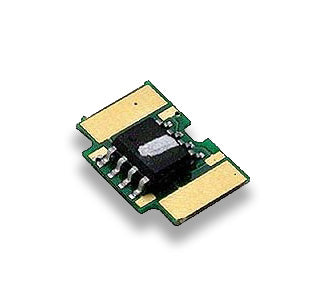
A motor decoder controls locomotive movement. A lighting decoder can use a DCC address and configuration settings without controlling a motor. The featured photograph shows a Kato FR11 interior-light decoder, so it illustrates that distinction rather than the motor adjustments below.
| Decoder example | Job | Meaning for this guide |
|---|---|---|
| NCE 5240174 D13J | A locomotive decoder for motor control. | Relevant to locomotive movement and speed setup; verify its manual, connection and electrical requirements for the installation. |
| Kato 29-353 FR11 | Interior-light control for compatible Kato HO and N LED lighting kits. | The featured photo shows this lighting decoder. It does not provide locomotive motor control, so the motor-tuning steps are not its job. |
Use the CV number to find the right setting
This map follows the common NMRA CV assignments. It is a way to find the relevant section of the decoder manual, not a universal set of values to program.
| CV number | Usual job | What to check before changing it |
|---|---|---|
| CV1 | Primary or short address. | The command station's address workflow and the decoder's supported address range. |
| CV17 and CV18, with CV29 | Extended address and the configuration that selects it. | Let the command station calculate the coordinated settings; CV29 also contains other options. |
| CV3 and CV4 | Acceleration and deceleration momentum. | How this decoder interprets the values and how much stopping distance the layout allows. |
| CV2 | Starting motor-drive setting. | Whether it is supported and how the locomotive behaves at the lowest speed step. |
| CV5 and CV6 | Maximum and middle motor-drive settings for a basic speed curve. | These are optional features; the manual must confirm support and any interaction with a speed table. |
For a long address, use the command station's address-setting procedure unless the decoder instructions require another method. CV29 contains several choices in the same value. Writing an arbitrary number there can change more than the address type, so avoid a copied “one-value” shortcut.
Change one behavior and test it
- Start with a locomotive that runs reliably. Poor electrical pickup, binding mechanisms and rough track need attention before CV tuning. Programming cannot repair them.
- Record the starting settings. Note the decoder model, address and values you intend to change. Read them when your system supports readback; otherwise use a known saved configuration rather than assuming a guessed original value.
- Choose the correct programming mode. Follow the command station's service-track or operations-mode procedure. Confirm which locomotive will receive the change before writing it.
- Adjust a single supported setting. Test at low speed in both directions and compare the result with the previous behavior. Restore the recorded value if the change is unhelpful.
- Test the operating job. A setting that looks good with one engine running alone may need further checking with its normal train and switching moves.
Separate momentum from the speed curve
Acceleration and deceleration determine how quickly the locomotive responds to a change at the throttle. Modest momentum can make a start look smoother; too much can make precise coupling difficult. Deceleration also changes how far the train continues after you reduce the throttle, so start testing where there is room to stop.
A speed curve shapes the motor response at different speed steps. If the decoder supports CV2, CV5 and CV6, those settings offer a basic starting, maximum and middle adjustment. A full speed table provides more points, but adds more settings and may require a separate enable option. Use the method the manual describes and change methods deliberately instead of combining recipes.
When matching locomotives for a consist, compare them under the same test conditions and check their behavior across the speeds you will use. A similar top speed alone does not show that they will start or slow together.
Questions before programming DCC CVs
Are the CV numbers the same on every decoder?
Standard assignments cover many familiar functions, but not every function is required or supported. Manufacturer-specific and indexed settings need the instructions for that exact decoder.
Can I read a CV back while the locomotive is on the main line?
That depends on the command station, decoder and feedback capabilities. Do not treat a successful write command as proof that your system can read the value back in the same mode.
Why does the locomotive no longer answer after changing its address?
First confirm the address selected on the throttle. If short and extended addressing do not agree with the decoder configuration, follow the system's address-programming procedure again rather than changing unrelated speed settings.
Should I reset the decoder before every adjustment?
No. A reset can discard useful custom settings. Use the exact manufacturer's reset procedure only when needed, after preserving the settings you want to keep; there is no reset value to assume for every decoder.
For the physical installation, browse model train parts and accessories and check each item's connection and fit requirements. Return to the Model Train Guides for more operating and layout help.

