

Diecast Model Guides
Use Vallejo 63.032 for Warm Fluorescent Highlights
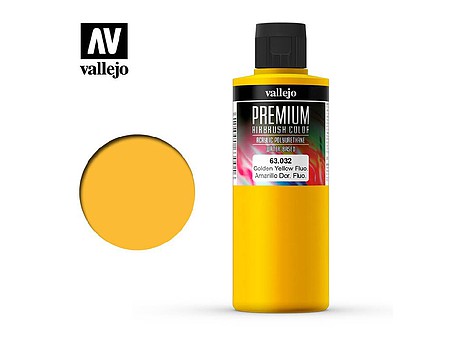
Vallejo Premium 63.032 Fluorescent Golden Yellow is useful when a bright accent needs warmth between yellow and orange. Think of a small flame graphic, a luminous-looking engine detail or a vivid color transition on a custom model. Plan the lightest part first, because this semiopaque fluorescent color lets the underlying paint influence the result.
Choose the effect before the color name
“Golden Yellow” describes the hue; it does not mean metallic gold. The Premium chart places 63.032 among the fluorescent colors. The 200 ml bottle contains the same named color family as the smaller 62.032 reference. For a reflective gold surface, choose a metallic paint instead.
| Premium color | Role in a color plan |
|---|---|
| 63.031 Fluorescent Yellow | A yellow accent to compare with the warmer Golden Yellow. |
| 63.032 Fluorescent Golden Yellow | A warmer yellow choice for a transition toward orange. |
| 63.033 Fluorescent Orange | An orange accent or a separate warm edge in the design. |
| 63.049 Metallic Gold | A metallic finish rather than a fluorescent color. |
Make these comparisons on painted samples under the light where the model will be displayed. A screen swatch is useful for identifying a color family, but it cannot show exactly how your primer, coverage and lighting will affect the finished part.
Keep a light area in the design
On a spare part, prepare the same primer and base colors you intend to use. Include a white area beside the darker surrounding color, then apply a light coat of Golden Yellow across the test. This shows how much the undercoat contributes and whether you need a separate light foundation inside the final graphic.
For a flame or energy effect, keep a small bright center and build the warmer color around it. A gradual transition gives the eye somewhere to read the brightest point. Covering every part equally can remove that contrast, even when the paint itself is vivid. This is a color-planning exercise; the paint does not create its own light.
Build the transition without flooding the center
Premium Color is intended for airbrushing over a suitably prepared, primed surface. Start with a controlled spray test and use Premium Color Reducer if the range's instructions call for dilution. Approach the chosen edge with light passes, stopping often enough to inspect the dry appearance. If you add orange, test its overlap with Golden Yellow before putting both on the model.
Mask adjacent areas when you need a sharp border. For a soft transition, practice the movement on the sample first and leave room beyond the painted shape for overspray. A final clear finish can change how the surface looks, so include your planned clear coat on part of the sample before committing to the whole project.
Our first-spray guide helps with the initial mixing and pattern check. The important result here is a highlight you can control, not a fixed number of coats.
Choose the exact bottle
Vallejo Premium Fluorescent Golden Yellow Airbrush Paint 200 ml

This 200 ml bottle suits a project that calls for the warm fluorescent yellow described above. It is color 63.032, not a metallic-gold paint.
Questions before you paint
Does Golden Yellow contain a metallic gold effect?
No. 63.032 is a fluorescent color. Metallic Gold 63.049 belongs to the metallic part of the Premium range.
Will it glow after the lights are switched off?
Do not choose it for that purpose. Fluorescent and phosphorescent paints are different categories; Vallejo lists a separate Phosphorescent color in Premium.
Can I cover a dark base in one pass?
It is semiopaque. Test the undercoat and build light layers instead of trying to force full coverage with one wet pass.
Browse model paints and finishing supplies for the rest of the project, or return to the Hobby Learning Center for related guides.

