

Hot Wheels How To
'83 Silverado Muncle Mike's Garage — Original Color Printable Decal PDF: Product Identity and Use Guide
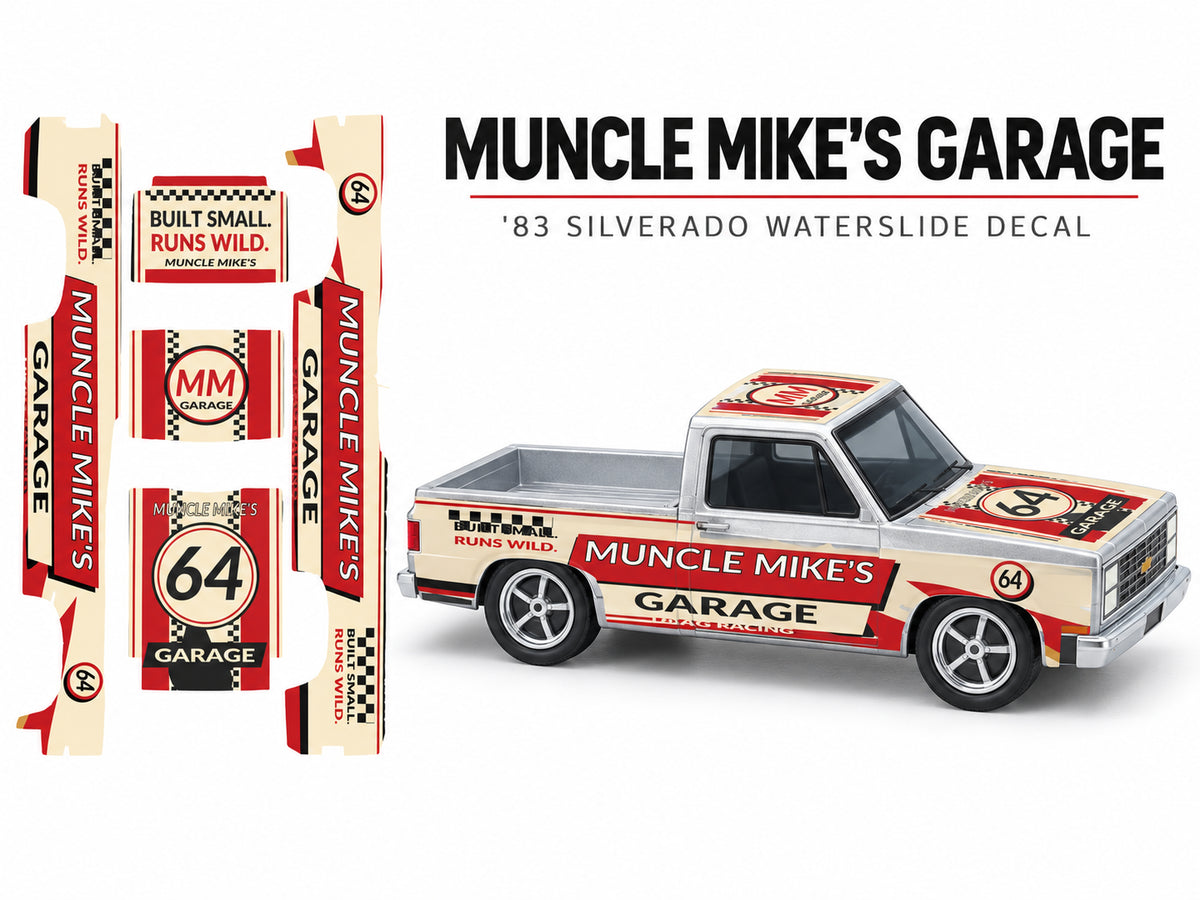
Use this guide to evaluate '83 Silverado Muncle Mike's Garage — Original Color Printable Decal PDF using the exact product identity and details in the current listing. Mockup preview: Finished-truck images are illustrative application previews. Your download contains flat waterslide decal artwork only; no physical car or printed decals are included. Built small. The item number or manufacturer reference is MM-DCL-S83-MMGARAGE.
Confirmed product details
Mockup preview: Finished-truck images are illustrative application previews. Your download contains flat waterslide decal artwork only; no physical car or printed decals are included. Built small. Runs wild. Give your ’83 Silverado custom a Muncle Mike’s Garage race-truck look with cream, racing red and black graphics, checkered accents and number 64. Digital waterslide decal artwork download only. No printed decals, truck, printer, ink, decal paper or tools are included. Get your PDF after checkout: Visit Your Decal Downloads and enter your order number and checkout email. After payment is complete, retrieve the eligible PDF from that order and save it. The file is retrieved on that page, not sent as an email attachment. What is included One single-page, artwork-only PDF with two opposite-side wraps and thre
For waterslide decals, prepare a smooth surface and follow the manufacturer's directions for cutting, soaking, positioning, and drying. Use setting solutions only if the package supports them; avoid moving a decal once it has begun to set.

Check identity, scale, and package contents
Match the manufacturer or item number, scale, and subject to the model or project you are preparing. Read the package information for included parts and quantities. A product's appearance in a photo does not establish that nearby accessories, a completed model, tools, or extra supplies are included.
For waterslide decals, prepare a smooth surface and follow the manufacturer's directions for cutting, soaking, positioning, and drying. Use setting solutions only if the package supports them; avoid moving a decal once it has begun to set. If dimensions or application details are important, verify them with the current product record or manufacturer instructions before starting work.

Use the product in a planned build
Set out the product with the model or surface before beginning. Confirm the subject and scale, organize small parts, and test a placement or application on a suitable sample when the material allows. Keep package instructions available throughout the build. For decals or finish materials, work on a clean, prepared surface and allow the product to settle or cure as directed by its maker.
View '83 Silverado Muncle Mike's Garage — Original Color Printable Decal PDF for current contents and availability. Review the manufacturer's item number and the photos again if the product is being purchased for a specific kit or model.
Frequently asked questions
What exactly is this product?
Mockup preview: Finished-truck images are illustrative application previews. Your download contains flat waterslide decal artwork only; no physical car or printed decals are included. Built small.
Which reference should I use to confirm it?
Match the item or SKU, subject, scale, and package details to the current product page.
Are all items in the photos included?
Only the components listed in the current package description are included. Check it before ordering.
Where can I find use instructions?
Follow the package and manufacturer directions for this exact item.

