
News
Planning a 1:400 Airbus Airport Display: A321 Parking vs. A330 Space
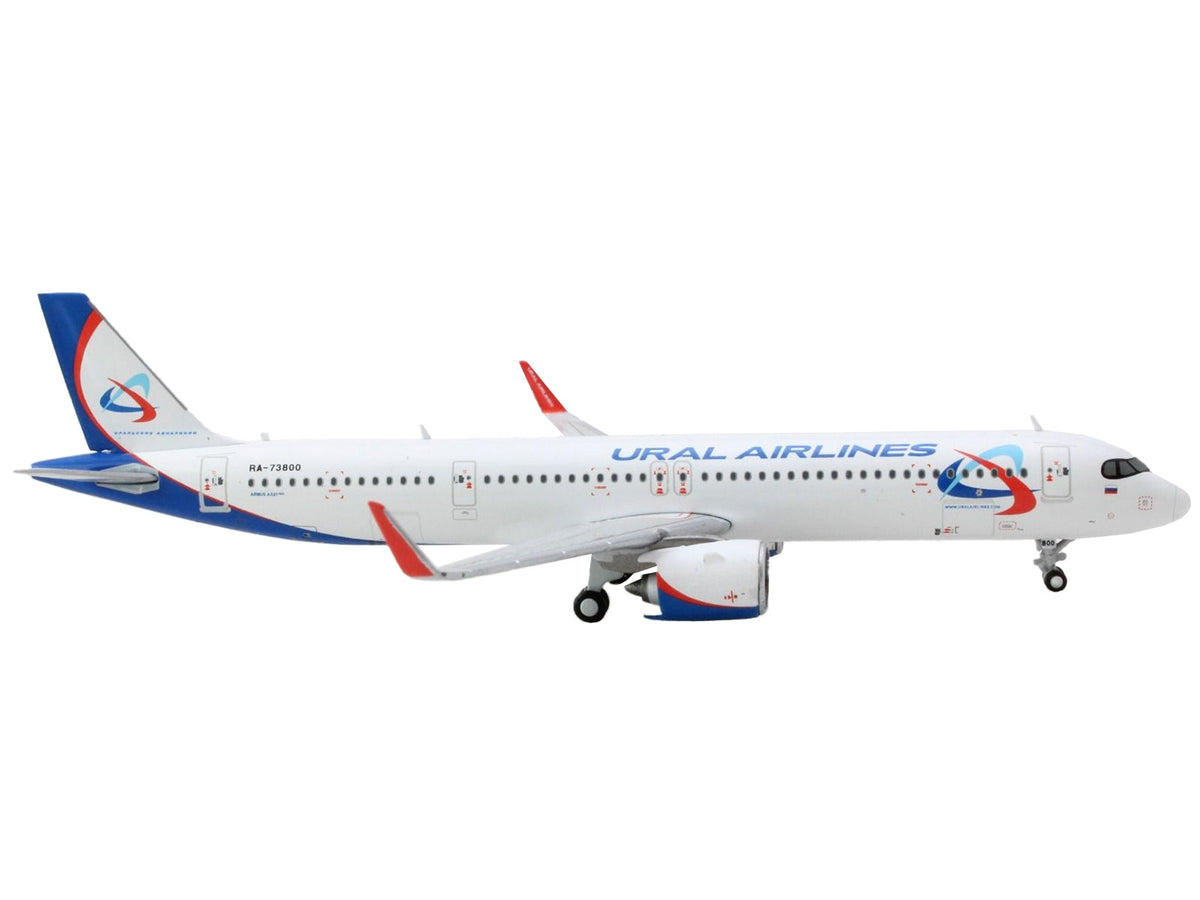
Plan the apron around the largest aircraft you intend to add, not just the first model you buy. Two compact A321neos and an A330 MRTT all use 1:400 scale here, but the tanker needs a considerably wider space. Matching scale is only the first step toward a display that fits.
Start with a simple paper layout before choosing a terminal or permanently attaching scenery. It is easier to move a paper aircraft footprint than rebuild a crowded model airport.
Choose Airbus aircraft for a small-scale display
Start with the two A321neo options
The Hawaiian A321neo GJHAL2415 and Ural A321neo GJ2195 each have approximate catalog dimensions of 4.5 inches long and 3.5 inches in wingspan.
For an initial layout, cut two rectangles at those dimensions and label them with the aircraft names. Two rectangles side by side already occupy seven inches across their combined spans before adding separation, terminal clearance or an outer border.
That is a conservative planning exercise, not an exact model contour or an airport-design standard. You may arrange the real aircraft differently, but overlapping paper rectangles should prompt a closer wing-and-tail clearance check.
Reserve a larger position for an A330
The French A330 MRTT GM105 is listed at approximately 6.25 inches long with a 5.75-inch span. An A321-sized parking position is not an adequate assumption for this model.
A separate military-themed area can be a deliberate choice in a mixed collection. Label the scene as your own arrangement rather than implying that these particular airlines and the tanker were photographed together at a real airport.
If you prefer a civil-airline-only display, begin with the A321neos and reserve uncommitted space rather than adding a military subject solely to fill an empty position.
Check a terminal before treating it as compatible
A 1:400 label on a building or accessory does not guarantee that its jet bridge reaches the intended aircraft door. Check the bridge's height and reach, the space around the wing and engine, and the aircraft's position relative to the terminal face.
Keep accessories from resting against the fuselage or wings. For an expensive aircraft, a small visible gap is preferable to forcing a bridge or vehicle against delicate parts to make the scene appear connected.
No terminal, ground vehicle or apron mat is included with the three aircraft offers discussed here. This guide does not certify a particular accessory system as compatible.
Make the display accessible after it is finished
Leave a way to lift each model from a suitable supported area without catching a neighboring wing. Permanent scenery placed too close can make routine repositioning awkward even when the aircraft technically fits.
Also consider your viewing height. A low apron display can reveal wing shapes clearly, while a higher shelf may favor the fuselage sides and tail designs. Place the livery you care about where it remains visible.
Buy the aircraft before committing to exact gate geometry
Use the catalog measurements to shortlist a layout, then check the actual models and supplied instructions before fixing the positions. All three listings exclude stands; an elevated aircraft would require a separate verified support.
For choosing the two airline schemes, read the Hawaiian versus Ural comparison. Keep future expansion modest enough that each aircraft remains visible rather than filling every available inch.
Find Airbus models for your planned airport scene
Product dimensions and contents reviewed September 23, 2026. Measurements are approximate; layout examples are planning aids, not verified accessory compatibility.
Current Muncle Mikes Aircraft examples

Airbus A321 American Airlines — GeminiJets
Use the live listing to compare scale, configuration, included parts and display fit with this guide.

Airbus A321P2F Lufthansa Cargo — GeminiJets
Use the live listing to compare scale, configuration, included parts and display fit with this guide.

Saab 340B Eastern Express — GeminiJets
Use the live listing to compare scale, configuration, included parts and display fit with this guide.
